I am unable to site the hyperlinks propers as the arrows that are suppose to go on either side of the link disappear on this blog due to that fact that they react as html code inside of the post window.
“Microsoft’s Future Vision 2019.” YouTube. 1 March 2009. 23 February 2010.
http://www.youtube.com/watch?v=g9JBSEBu2q8&feature=fvw.
A promotional video from Microsoft about Multi-Touch screen technology, demonstrating all the multiply possibilities that Multi-Touch technology can be applied to in every day life. Things from usesage inside the classroom, business offices and traveling.
“Microsoft Surface Demo @ CES 2008.” YouTube. 8 January 2008. 23 February 2010.
http://www.youtube.com/watch?v=Zxk_WywMTzc&feature=fvw.
This video displays user and Multi-Touch screen interaction. It also explains how Multi-Touch screens can take shape in the future, such as tables and for use on the wall, and the different kinds of companies will use Multi-Touch screens, such as advertisers and Macintosh computers.
“Multi-touch interface (from Adobe TED).” YouTube. 3 August 2006. 23 February 2010.
http://www.youtube.com/watch?v=UcKqyn-gUbY.
A video of how Jeff Han, a research scientist for NYU's Media Research Lab, demonstrates how different interfaces can be applied to a Multi-Touch surface. This video was filmed in 2006 displaying the interface now used on Mac's iPhone and iPad.
Pearson, Gary. “U of C revolutionizing touch-screen technology.”
Calgary Herald, 23 March 2010. 28 February 2010.
http://www.calgaryherald.com/technology/revolutionizing+touch+screen+technology/2715191/story.html.
This article from the Calgary Herald website discusses how the University of Calgary and other Canadian universities putting Touch-screen technology in to people's houses, business offices and school class rooms. They hope to develop new software for multi-touch screens for new user friendly interfaces and to change the way people use computers. The University of Calgary hopes to one day see touch-screens become wall size for people to use.
Bell, Donald. “Piano app for iPad proves screen size matters.” CNET, 26 March 2010, CBS Interactive. 28 March 2010.
http://news.cnet.com/8301-17938_105-20001276-1.html.
This article makes a point about how Mac's iPad has the ability to push development for multi-touch software. When the iPhone was introduced, the size of it's small multi-touch screen only allowed it to use certain software application. With the increased size of iPad's Multi-Touch screen, more freedom has been allocated to the programs that can be used on the iPad's Multi-Touch surface.
Derene, Glenn. “Microsoft Surface: Behind-the-Scenes First Look (with Video).” Popular Mechanics, July 2007. 28 March 2010.
http://www.popularmechanics.com/technology/industry/4217348.htm.
Popular Mechanics' article gives a review of Mac's iPad. While it talks about a lot of it's negative points, it also explains the positive aspects of the iPad, thus showing the potential of future multi-touch technology. It discusses the iPad's iBook app, which allows a user to read material from novels, newspapers to comics on it. Its discusses it's video and potential television display abilities as well as displaying photos. With it's large, and interactive screen and it's ability to download content from the Internet, the iPad is just one example of Multi-Touch hardware.
Goldsbie, Jonathan. "Councillor Kelly wants your neighborhood to look like Dundas Square." Spacing Toronto. 4 December 2009. 23 February 2010.
http://spacing.ca/wire/2009/12/04/councillor-kelly-wants-your-neighbourhood-to-look-like-dundas-square/.
The article about using digital screens for billboards talks about turning every billboard into this digital format. It shows the concerns that some people in Toronto have about the city have more commercial content in it's neighborhoods. Its also informative as to some of the bylaws concerning billboards, such as the new tax that has come into effect this year. It relates to my thesis about digital posters with multi-touch screens as the technology here is similar to what is discussed in my thesis proposal.
Piquepaille, Roland. "Multi-touch smart desks in the classroom." Emerging Technology Trends. 17 September 2008. 3 April 2010.
http://blogs.zdnet.com/emergingtech/?p=1039.
Interactive Classrooms are the subject in this article. The article discusses how tests in classrooms with Multi-Touch tables has increased learning and participation in children. The scientists at the Durham university hope to see Multi-Touch screens replace regular school desks used for students in the next 10 years.
Stiansen, Carl. "Smart desks make sci-fi a reality in the classroom." EurekAlert! 4 April 2010.
http://www.eurekalert.org/pub_releases/2008-09/du-sdm091608.php.
"Multi-Touch in Education." Networked Content. 9 April 2010. 2 February 2010.
More articles about the Multi-Touch tables used in classrooms at Durham University in the UK.
Bradley, Dave. "Through Window Touch Screen - Is This the New Outdoor Digital Signage Solution of the Future?" Ezine Articles. 10 April 2010. 15 April 2010.
http://ezinearticles.com/?Through-Window-Touch-Screen---Is-This-the-New-Outdoor-Digital-Signage-Solution-of-the-Future?&id=4086945.
Another article about digital posters being used for advertising. It basically talks about Outdoor digital advertising screens.
"Custom Kiosk." Arc Design Consulting. 15 April 2010.
http://www.arcdesignconsulting.com/custom-kiosk.php.
While a little off topic, a Kiosk station could work for the TTC way finding Multi-Screen system, since they are do use Multi-Screen technology and can obtain up to date information from the Internet concerning TTC information.
Blackett, Matthew. "TTC subway map in Chinese." Spacing Toronto. 10 December 2007. 29 March 2010.
http://spacing.ca/wire/2007/12/10/ttc-subway-map-in-chinese/.
Spacing Toronto has provided an interesting proposal asking people to make suggestions on how to make the TTC better. A lot of talk has been about providing Ride Guides and TTC bus, streetcar and subway maps with translations for non-english citizens of Toronto. While providing maps and way-finding signage is a step in the right direction, a Multi-Touch interface could provide a more available, direct and quick delivery of the desire information.
"Toronto Public Space Committee" Facebook. 1 April 2010.
http://www.facebook.com/group.php?gid=2242738931.
The Toronot Public Space Committee is dedicated to free and preserving public space from advertising companies and commercialism. They want to see billboard in Toronto and other public ads gone to free up the public space so that citizens of Toronto can socialize and interact with in their neighborhoods without being influenced by advertising.
Thursday, April 15, 2010


Wednesday, April 14, 2010
Multi-Touch Wayfinding Stations in the TTC
The Proposal
Question: Can a Multi-Touch application assist with way-finding in the TTC?
I want to research how an Interactive Multi-Touch screen can assist those who use the TTC to get around Toronto. I want to see if passengers can use it to map out their destinations and if new comers to the city can find it useful for navigation. Also, I want to investigate whether it can help break down communication barriers for those who are from out of the country and don't speak languages commonly spoken in Toronto.
The Need
Living in Toronto, like many people, I use the TTC. I have to rely on the TTC to get me almost every where I want to go. As much as I rely on Toronto's public transportation, I do not know all the routes to take to be me from one place and to the next. I sure many like me, have faced the same problem in trying to map out new routes. While the TTC subway has to be one of the simplest laid oust subway tunnels in the world, for someone coming off that route to venture in to unfamiliar territory, such as the streetcars and buses, it can be a confusing experience in trying to chose which method of transportation next.
While public transportation can be confusing for the average Toronto citizen, if can be more confusing for visitors and new comers. Trying to read the bus routes and make sense of streetcar maps can be hard for someone not use to taking the TTC. And as easy as the subway and clear as the subway map in the subway station, I have been approached by people who can not figure out how to get to the next station.
My goal is to see how a Interactive digital interface can assist people in finding their route using public transportation in Toronto. I want to see if a multi-touch screen, using a graphic system to help users guide their way through the interface, can help them find where they want to go. The idea is similar to the map capabilities of google maps, the TTC interface can provide precise information pertaining to its routes, such as the exact direction each bus, streetcar and bus takes as well as schedule times and even updates such as route changes and delays.
The Audience
The users that my thesis will be addressing are those who use Toronto's public transportation as well as new Canadian citizens, immigrants and even those visiting Canada from other countries. Members of those groups who do not speak or have a hard times with the english language will find Multi-Touch Screen Communication Applications useful to find the information they need and to translate it to their native language.
The Deliverables
The deliverables of this core project could take the form of a small station digital screen with a multi-touch screen. With a multi-touch screen as a interface, the user can use the screen to select what language they are accustomed through the selection of universal graphic marks. They can then chose to set all the information that appears on the screen in their language or have the station speak it to them. Here TTC passengers can use the station to access the desire route the wish to take across the city using public transportation.
The Realization
My research will have to focus on preexisting TTC maps and way finding. I will first have to understand how the TTC guides it's passengers first before I try to improve it with a new way-finding system. I will also have to focus on other way-finding systems, such as how google maps works as mentioned before. Another area to concentrate on would be universal design, as their are many different cultures here that live in Toronto. As mentioned before, the TTC interface would be useful to those visiting Toronto, so universal design would be helpful for anyone who comes from a different cultural background and does not understand the signs, symbols or language currently used by the TTC. The universal design would help me to focus on how to communication with users and develop easy to understand graphics for Multi-Touch screen navigation.
Educational Benefit
The core project will benefit my education by allowing me to explore user interaction, developing graphic marks with universal appeal, how to establish cultural-cimmunication, how to plot easy to follow way-finding navigation and exploring multi-touch screen technology to see how it can applied to new public service.
Question: Can a Multi-Touch application assist with way-finding in the TTC?
I want to research how an Interactive Multi-Touch screen can assist those who use the TTC to get around Toronto. I want to see if passengers can use it to map out their destinations and if new comers to the city can find it useful for navigation. Also, I want to investigate whether it can help break down communication barriers for those who are from out of the country and don't speak languages commonly spoken in Toronto.
The Need
Living in Toronto, like many people, I use the TTC. I have to rely on the TTC to get me almost every where I want to go. As much as I rely on Toronto's public transportation, I do not know all the routes to take to be me from one place and to the next. I sure many like me, have faced the same problem in trying to map out new routes. While the TTC subway has to be one of the simplest laid oust subway tunnels in the world, for someone coming off that route to venture in to unfamiliar territory, such as the streetcars and buses, it can be a confusing experience in trying to chose which method of transportation next.
While public transportation can be confusing for the average Toronto citizen, if can be more confusing for visitors and new comers. Trying to read the bus routes and make sense of streetcar maps can be hard for someone not use to taking the TTC. And as easy as the subway and clear as the subway map in the subway station, I have been approached by people who can not figure out how to get to the next station.
My goal is to see how a Interactive digital interface can assist people in finding their route using public transportation in Toronto. I want to see if a multi-touch screen, using a graphic system to help users guide their way through the interface, can help them find where they want to go. The idea is similar to the map capabilities of google maps, the TTC interface can provide precise information pertaining to its routes, such as the exact direction each bus, streetcar and bus takes as well as schedule times and even updates such as route changes and delays.
The Audience
The users that my thesis will be addressing are those who use Toronto's public transportation as well as new Canadian citizens, immigrants and even those visiting Canada from other countries. Members of those groups who do not speak or have a hard times with the english language will find Multi-Touch Screen Communication Applications useful to find the information they need and to translate it to their native language.
The Deliverables
The deliverables of this core project could take the form of a small station digital screen with a multi-touch screen. With a multi-touch screen as a interface, the user can use the screen to select what language they are accustomed through the selection of universal graphic marks. They can then chose to set all the information that appears on the screen in their language or have the station speak it to them. Here TTC passengers can use the station to access the desire route the wish to take across the city using public transportation.
The Realization
My research will have to focus on preexisting TTC maps and way finding. I will first have to understand how the TTC guides it's passengers first before I try to improve it with a new way-finding system. I will also have to focus on other way-finding systems, such as how google maps works as mentioned before. Another area to concentrate on would be universal design, as their are many different cultures here that live in Toronto. As mentioned before, the TTC interface would be useful to those visiting Toronto, so universal design would be helpful for anyone who comes from a different cultural background and does not understand the signs, symbols or language currently used by the TTC. The universal design would help me to focus on how to communication with users and develop easy to understand graphics for Multi-Touch screen navigation.
Educational Benefit
The core project will benefit my education by allowing me to explore user interaction, developing graphic marks with universal appeal, how to establish cultural-cimmunication, how to plot easy to follow way-finding navigation and exploring multi-touch screen technology to see how it can applied to new public service.
Sunday, April 11, 2010
Digital Ads with Multi-Touch Surfaces

The Proposal
Can digital ad posters, with multi-touch technology, help provide an as alternative way as advertising to lessen the amount of advertising posters and billboards in downtown toronto?
Multi-Touch surface technology has revolutionized many of the every day products we have
today. From computers to phones, it seems that multi-touch technology will soon be become more commonly found as different ideas on incorporating into devices appear. My second thesis proposal deals with the incorporation of multi-touch screens into digital ad posters.
The Need
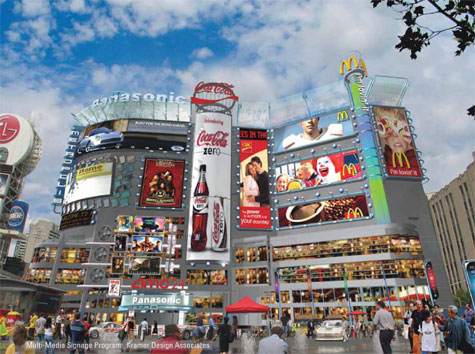
In the Yonge and Dundas Street area of Toronto, the city block is surrounded by large billboards, with a various amount of ads. With the billboards changing the appearance of the cityscape of the city, new concerns of visual may rise. As well, the difference between an acceptable amount of billboards and a large amount of billboards considered too many, could become a factor as city by-laws come into play.
Issues such as the amount of billboards allowed in certain areas of the city and how much Toronto can tax the billboards. (http://www.cbc.ca/canada/toronto/story/2009/12/07/toronto-billboard-tax693.html) Ad posters with multi-touch screens can create a new realm of interactive, much in the same way a professional website has crated to potential customers.
Realization
Interactive ad posters with an multi-touch surface would have the potential to house the advertisement of many different sponsors, from posters of new movies, events and fashion for example. The viewer can then access the poster's multi-touch screen to view any ad of his choice, making the viewer now the user (http://www.smart6six.com/touch_screen.html). Interactive ad posters have the potential to lessen the amount of space and materials used for advertising in public spaces.
Audience
The target audience would be crowds who travel through the busy areas of Toronto. Such as Yonge and Dundas Square or other shopping malls where many of these digital and interactive posters would be set up to advertise to shoppers. While providing an easy means to interact with ad posters, it would also free up the urban space around these shopping districts.
Learning Outcomes
I would like to learn more on the subject of the interaction between digital medium, how multi-touch screens are becoming more common place and revolutionizing every day items. I would also like to learn more on the topic of billboard advertising and hear what the people of Toronto feel about it, as well what other countries have done about it. Between my friends, in and outside of OCAD, we have criticized Yonge and Dundas square with looking like Times Square in New York. While I have only bee able to find a wiki page on the topic of the Yonge and Dundas controversy, I wish to look further into the topic of the amount of billboards present and what the people of Toronto think of them.
“Toronto's billboard Tax Approved,” CBS News. 7 December 2009. 11 April 2010.
http://www.cbc.ca/canada/toronto/story/2009/12/07/toronto-billboard-tax693.html.
"Touch Screens," Smart Six Company. 11 April 2010.
http://www.smart6six.com/touch_screen.html.
"ADPOD AND RAILWAY STATIONS POD," Smart Six Company. 11 April 2010.
http://www.smart6six.com/touch_screen.html.
"AD POD - This is totally bigger than IPO," Youtube. 23 February 2010. 11 April 2010.
http://www.youtube.com/watch?v=QKFRQ7XCm3E.
"Retail", Flasma: Moving images in the floor. 11 April 2010.
http://www.flasma.com/ideas/retail.aspx.
Goldsbie, Jonathan. "Councillor Kelly wants your neighbourhood to look like Dundas Square," Spacing Toronto. 4 December 2009. 11 April 2010. http://spacing.ca/wire/2009/12/04/councillor-kelly-wants-your-neighbourhood-to-look-like-dundas-square/.
Subscribe to:
Posts (Atom)