I am unable to site the hyperlinks propers as the arrows that are suppose to go on either side of the link disappear on this blog due to that fact that they react as html code inside of the post window.
“Microsoft’s Future Vision 2019.” YouTube. 1 March 2009. 23 February 2010.
http://www.youtube.com/watch?v=g9JBSEBu2q8&feature=fvw.
A promotional video from Microsoft about Multi-Touch screen technology, demonstrating all the multiply possibilities that Multi-Touch technology can be applied to in every day life. Things from usesage inside the classroom, business offices and traveling.
“Microsoft Surface Demo @ CES 2008.” YouTube. 8 January 2008. 23 February 2010.
http://www.youtube.com/watch?v=Zxk_WywMTzc&feature=fvw.
This video displays user and Multi-Touch screen interaction. It also explains how Multi-Touch screens can take shape in the future, such as tables and for use on the wall, and the different kinds of companies will use Multi-Touch screens, such as advertisers and Macintosh computers.
“Multi-touch interface (from Adobe TED).” YouTube. 3 August 2006. 23 February 2010.
http://www.youtube.com/watch?v=UcKqyn-gUbY.
A video of how Jeff Han, a research scientist for NYU's Media Research Lab, demonstrates how different interfaces can be applied to a Multi-Touch surface. This video was filmed in 2006 displaying the interface now used on Mac's iPhone and iPad.
Pearson, Gary. “U of C revolutionizing touch-screen technology.”
Calgary Herald, 23 March 2010. 28 February 2010.
http://www.calgaryherald.com/technology/revolutionizing+touch+screen+technology/2715191/story.html.
This article from the Calgary Herald website discusses how the University of Calgary and other Canadian universities putting Touch-screen technology in to people's houses, business offices and school class rooms. They hope to develop new software for multi-touch screens for new user friendly interfaces and to change the way people use computers. The University of Calgary hopes to one day see touch-screens become wall size for people to use.
Bell, Donald. “Piano app for iPad proves screen size matters.” CNET, 26 March 2010, CBS Interactive. 28 March 2010.
http://news.cnet.com/8301-17938_105-20001276-1.html.
This article makes a point about how Mac's iPad has the ability to push development for multi-touch software. When the iPhone was introduced, the size of it's small multi-touch screen only allowed it to use certain software application. With the increased size of iPad's Multi-Touch screen, more freedom has been allocated to the programs that can be used on the iPad's Multi-Touch surface.
Derene, Glenn. “Microsoft Surface: Behind-the-Scenes First Look (with Video).” Popular Mechanics, July 2007. 28 March 2010.
http://www.popularmechanics.com/technology/industry/4217348.htm.
Popular Mechanics' article gives a review of Mac's iPad. While it talks about a lot of it's negative points, it also explains the positive aspects of the iPad, thus showing the potential of future multi-touch technology. It discusses the iPad's iBook app, which allows a user to read material from novels, newspapers to comics on it. Its discusses it's video and potential television display abilities as well as displaying photos. With it's large, and interactive screen and it's ability to download content from the Internet, the iPad is just one example of Multi-Touch hardware.
Goldsbie, Jonathan. "Councillor Kelly wants your neighborhood to look like Dundas Square." Spacing Toronto. 4 December 2009. 23 February 2010.
http://spacing.ca/wire/2009/12/04/councillor-kelly-wants-your-neighbourhood-to-look-like-dundas-square/.
The article about using digital screens for billboards talks about turning every billboard into this digital format. It shows the concerns that some people in Toronto have about the city have more commercial content in it's neighborhoods. Its also informative as to some of the bylaws concerning billboards, such as the new tax that has come into effect this year. It relates to my thesis about digital posters with multi-touch screens as the technology here is similar to what is discussed in my thesis proposal.
Piquepaille, Roland. "Multi-touch smart desks in the classroom." Emerging Technology Trends. 17 September 2008. 3 April 2010.
http://blogs.zdnet.com/emergingtech/?p=1039.
Interactive Classrooms are the subject in this article. The article discusses how tests in classrooms with Multi-Touch tables has increased learning and participation in children. The scientists at the Durham university hope to see Multi-Touch screens replace regular school desks used for students in the next 10 years.
Stiansen, Carl. "Smart desks make sci-fi a reality in the classroom." EurekAlert! 4 April 2010.
http://www.eurekalert.org/pub_releases/2008-09/du-sdm091608.php.
"Multi-Touch in Education." Networked Content. 9 April 2010. 2 February 2010.
More articles about the Multi-Touch tables used in classrooms at Durham University in the UK.
Bradley, Dave. "Through Window Touch Screen - Is This the New Outdoor Digital Signage Solution of the Future?" Ezine Articles. 10 April 2010. 15 April 2010.
http://ezinearticles.com/?Through-Window-Touch-Screen---Is-This-the-New-Outdoor-Digital-Signage-Solution-of-the-Future?&id=4086945.
Another article about digital posters being used for advertising. It basically talks about Outdoor digital advertising screens.
"Custom Kiosk." Arc Design Consulting. 15 April 2010.
http://www.arcdesignconsulting.com/custom-kiosk.php.
While a little off topic, a Kiosk station could work for the TTC way finding Multi-Screen system, since they are do use Multi-Screen technology and can obtain up to date information from the Internet concerning TTC information.
Blackett, Matthew. "TTC subway map in Chinese." Spacing Toronto. 10 December 2007. 29 March 2010.
http://spacing.ca/wire/2007/12/10/ttc-subway-map-in-chinese/.
Spacing Toronto has provided an interesting proposal asking people to make suggestions on how to make the TTC better. A lot of talk has been about providing Ride Guides and TTC bus, streetcar and subway maps with translations for non-english citizens of Toronto. While providing maps and way-finding signage is a step in the right direction, a Multi-Touch interface could provide a more available, direct and quick delivery of the desire information.
"Toronto Public Space Committee" Facebook. 1 April 2010.
http://www.facebook.com/group.php?gid=2242738931.
The Toronot Public Space Committee is dedicated to free and preserving public space from advertising companies and commercialism. They want to see billboard in Toronto and other public ads gone to free up the public space so that citizens of Toronto can socialize and interact with in their neighborhoods without being influenced by advertising.
Thursday, April 15, 2010


Wednesday, April 14, 2010
Multi-Touch Wayfinding Stations in the TTC
The Proposal
Question: Can a Multi-Touch application assist with way-finding in the TTC?
I want to research how an Interactive Multi-Touch screen can assist those who use the TTC to get around Toronto. I want to see if passengers can use it to map out their destinations and if new comers to the city can find it useful for navigation. Also, I want to investigate whether it can help break down communication barriers for those who are from out of the country and don't speak languages commonly spoken in Toronto.
The Need
Living in Toronto, like many people, I use the TTC. I have to rely on the TTC to get me almost every where I want to go. As much as I rely on Toronto's public transportation, I do not know all the routes to take to be me from one place and to the next. I sure many like me, have faced the same problem in trying to map out new routes. While the TTC subway has to be one of the simplest laid oust subway tunnels in the world, for someone coming off that route to venture in to unfamiliar territory, such as the streetcars and buses, it can be a confusing experience in trying to chose which method of transportation next.
While public transportation can be confusing for the average Toronto citizen, if can be more confusing for visitors and new comers. Trying to read the bus routes and make sense of streetcar maps can be hard for someone not use to taking the TTC. And as easy as the subway and clear as the subway map in the subway station, I have been approached by people who can not figure out how to get to the next station.
My goal is to see how a Interactive digital interface can assist people in finding their route using public transportation in Toronto. I want to see if a multi-touch screen, using a graphic system to help users guide their way through the interface, can help them find where they want to go. The idea is similar to the map capabilities of google maps, the TTC interface can provide precise information pertaining to its routes, such as the exact direction each bus, streetcar and bus takes as well as schedule times and even updates such as route changes and delays.
The Audience
The users that my thesis will be addressing are those who use Toronto's public transportation as well as new Canadian citizens, immigrants and even those visiting Canada from other countries. Members of those groups who do not speak or have a hard times with the english language will find Multi-Touch Screen Communication Applications useful to find the information they need and to translate it to their native language.
The Deliverables
The deliverables of this core project could take the form of a small station digital screen with a multi-touch screen. With a multi-touch screen as a interface, the user can use the screen to select what language they are accustomed through the selection of universal graphic marks. They can then chose to set all the information that appears on the screen in their language or have the station speak it to them. Here TTC passengers can use the station to access the desire route the wish to take across the city using public transportation.
The Realization
My research will have to focus on preexisting TTC maps and way finding. I will first have to understand how the TTC guides it's passengers first before I try to improve it with a new way-finding system. I will also have to focus on other way-finding systems, such as how google maps works as mentioned before. Another area to concentrate on would be universal design, as their are many different cultures here that live in Toronto. As mentioned before, the TTC interface would be useful to those visiting Toronto, so universal design would be helpful for anyone who comes from a different cultural background and does not understand the signs, symbols or language currently used by the TTC. The universal design would help me to focus on how to communication with users and develop easy to understand graphics for Multi-Touch screen navigation.
Educational Benefit
The core project will benefit my education by allowing me to explore user interaction, developing graphic marks with universal appeal, how to establish cultural-cimmunication, how to plot easy to follow way-finding navigation and exploring multi-touch screen technology to see how it can applied to new public service.
Question: Can a Multi-Touch application assist with way-finding in the TTC?
I want to research how an Interactive Multi-Touch screen can assist those who use the TTC to get around Toronto. I want to see if passengers can use it to map out their destinations and if new comers to the city can find it useful for navigation. Also, I want to investigate whether it can help break down communication barriers for those who are from out of the country and don't speak languages commonly spoken in Toronto.
The Need
Living in Toronto, like many people, I use the TTC. I have to rely on the TTC to get me almost every where I want to go. As much as I rely on Toronto's public transportation, I do not know all the routes to take to be me from one place and to the next. I sure many like me, have faced the same problem in trying to map out new routes. While the TTC subway has to be one of the simplest laid oust subway tunnels in the world, for someone coming off that route to venture in to unfamiliar territory, such as the streetcars and buses, it can be a confusing experience in trying to chose which method of transportation next.
While public transportation can be confusing for the average Toronto citizen, if can be more confusing for visitors and new comers. Trying to read the bus routes and make sense of streetcar maps can be hard for someone not use to taking the TTC. And as easy as the subway and clear as the subway map in the subway station, I have been approached by people who can not figure out how to get to the next station.
My goal is to see how a Interactive digital interface can assist people in finding their route using public transportation in Toronto. I want to see if a multi-touch screen, using a graphic system to help users guide their way through the interface, can help them find where they want to go. The idea is similar to the map capabilities of google maps, the TTC interface can provide precise information pertaining to its routes, such as the exact direction each bus, streetcar and bus takes as well as schedule times and even updates such as route changes and delays.
The Audience
The users that my thesis will be addressing are those who use Toronto's public transportation as well as new Canadian citizens, immigrants and even those visiting Canada from other countries. Members of those groups who do not speak or have a hard times with the english language will find Multi-Touch Screen Communication Applications useful to find the information they need and to translate it to their native language.
The Deliverables
The deliverables of this core project could take the form of a small station digital screen with a multi-touch screen. With a multi-touch screen as a interface, the user can use the screen to select what language they are accustomed through the selection of universal graphic marks. They can then chose to set all the information that appears on the screen in their language or have the station speak it to them. Here TTC passengers can use the station to access the desire route the wish to take across the city using public transportation.
The Realization
My research will have to focus on preexisting TTC maps and way finding. I will first have to understand how the TTC guides it's passengers first before I try to improve it with a new way-finding system. I will also have to focus on other way-finding systems, such as how google maps works as mentioned before. Another area to concentrate on would be universal design, as their are many different cultures here that live in Toronto. As mentioned before, the TTC interface would be useful to those visiting Toronto, so universal design would be helpful for anyone who comes from a different cultural background and does not understand the signs, symbols or language currently used by the TTC. The universal design would help me to focus on how to communication with users and develop easy to understand graphics for Multi-Touch screen navigation.
Educational Benefit
The core project will benefit my education by allowing me to explore user interaction, developing graphic marks with universal appeal, how to establish cultural-cimmunication, how to plot easy to follow way-finding navigation and exploring multi-touch screen technology to see how it can applied to new public service.
Sunday, April 11, 2010
Digital Ads with Multi-Touch Surfaces

The Proposal
Can digital ad posters, with multi-touch technology, help provide an as alternative way as advertising to lessen the amount of advertising posters and billboards in downtown toronto?
Multi-Touch surface technology has revolutionized many of the every day products we have
today. From computers to phones, it seems that multi-touch technology will soon be become more commonly found as different ideas on incorporating into devices appear. My second thesis proposal deals with the incorporation of multi-touch screens into digital ad posters.
The Need
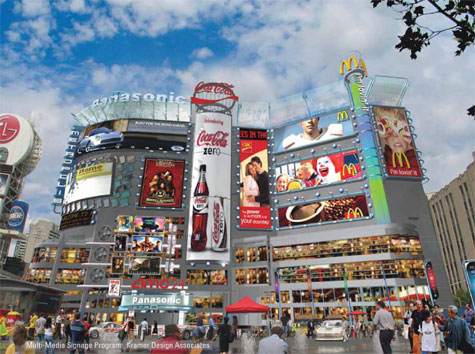
In the Yonge and Dundas Street area of Toronto, the city block is surrounded by large billboards, with a various amount of ads. With the billboards changing the appearance of the cityscape of the city, new concerns of visual may rise. As well, the difference between an acceptable amount of billboards and a large amount of billboards considered too many, could become a factor as city by-laws come into play.
Issues such as the amount of billboards allowed in certain areas of the city and how much Toronto can tax the billboards. (http://www.cbc.ca/canada/toronto/story/2009/12/07/toronto-billboard-tax693.html) Ad posters with multi-touch screens can create a new realm of interactive, much in the same way a professional website has crated to potential customers.
Realization
Interactive ad posters with an multi-touch surface would have the potential to house the advertisement of many different sponsors, from posters of new movies, events and fashion for example. The viewer can then access the poster's multi-touch screen to view any ad of his choice, making the viewer now the user (http://www.smart6six.com/touch_screen.html). Interactive ad posters have the potential to lessen the amount of space and materials used for advertising in public spaces.
Audience
The target audience would be crowds who travel through the busy areas of Toronto. Such as Yonge and Dundas Square or other shopping malls where many of these digital and interactive posters would be set up to advertise to shoppers. While providing an easy means to interact with ad posters, it would also free up the urban space around these shopping districts.
Learning Outcomes
I would like to learn more on the subject of the interaction between digital medium, how multi-touch screens are becoming more common place and revolutionizing every day items. I would also like to learn more on the topic of billboard advertising and hear what the people of Toronto feel about it, as well what other countries have done about it. Between my friends, in and outside of OCAD, we have criticized Yonge and Dundas square with looking like Times Square in New York. While I have only bee able to find a wiki page on the topic of the Yonge and Dundas controversy, I wish to look further into the topic of the amount of billboards present and what the people of Toronto think of them.
“Toronto's billboard Tax Approved,” CBS News. 7 December 2009. 11 April 2010.
http://www.cbc.ca/canada/toronto/story/2009/12/07/toronto-billboard-tax693.html.
"Touch Screens," Smart Six Company. 11 April 2010.
http://www.smart6six.com/touch_screen.html.
"ADPOD AND RAILWAY STATIONS POD," Smart Six Company. 11 April 2010.
http://www.smart6six.com/touch_screen.html.
"AD POD - This is totally bigger than IPO," Youtube. 23 February 2010. 11 April 2010.
http://www.youtube.com/watch?v=QKFRQ7XCm3E.
"Retail", Flasma: Moving images in the floor. 11 April 2010.
http://www.flasma.com/ideas/retail.aspx.
Goldsbie, Jonathan. "Councillor Kelly wants your neighbourhood to look like Dundas Square," Spacing Toronto. 4 December 2009. 11 April 2010. http://spacing.ca/wire/2009/12/04/councillor-kelly-wants-your-neighbourhood-to-look-like-dundas-square/.
Sunday, March 28, 2010
Someone stole my thesis idea!
Ok not really, after all no idea is original any more. But hey it got your attention....!
http://www.calgaryherald.com/technology/revolutionizing+touch+screen+technology/2715191/story.html
In this article, The U of C and six other Canadian universities are currently developing more multi-touch screens services for the public. It talks about how a multi-touch screen can help organize a meeting by arranging the information presented to all those involved in the meeting. Sounds like this could also be applied to anything from school class rooms as well, sort of like the micro-soft ad on youtube.... http://www.youtube.com/watch?v=XiqgmAYrd3c
http://www.calgaryherald.com/technology/revolutionizing+touch+screen+technology/2715191/story.html
In this article, The U of C and six other Canadian universities are currently developing more multi-touch screens services for the public. It talks about how a multi-touch screen can help organize a meeting by arranging the information presented to all those involved in the meeting. Sounds like this could also be applied to anything from school class rooms as well, sort of like the micro-soft ad on youtube.... http://www.youtube.com/watch?v=XiqgmAYrd3c
ipad
Of course, I can not leave the ipad out of my blog. Some love it and others hate it. Around OCAD, I've heard from my fellow students that they hate it and think it's crap. Maybe once they try it and experience it, they may change their minds. Myself, I have yet to try it of course but I feel that perhaps there's more to this technology then what is presented in the ipad it's self.
Basically, the ipad isn't anything we haven't seen before, in reality and in sci-fi. We have touch screens in daily services, such as bank machines and we have seen the movies where someone types information into a computerized tablet that their holding in their arms.
The thing about the ipad that people are asking about is, what can it do that my iphone and laptop can't do? It seems people aren't blown away by the ipad to the point of using it to replace or upgrade with what they have already. But maybe thats not the point of the ipad. The ipad gives the user a larger screen for other applications and uses. Its not as limiting as a iphone's screen, you could play video games on a ipad I'm sure and the screen is bigger, making it better suited for games. Also the screen's size makes it better suited for presentation purposes. While a laptop is a practical machine for a designer's work and can display it as well, so can the ipad. I wonder if it operates like the Microsoft surface table. What a way to impress the client.
While I strongly doubt I'll be getting the ipad, I would prefer a new, 17" screen MAC laptop, I feel it is something to take a good look at to see where this technology can go.
Below are the 2 links that inspired this entry...
http://news.cnet.com/8301-17938_105-20001276-1.html
http://www.popularmechanics.com/technology/industry/4217348.html
Basically, the ipad isn't anything we haven't seen before, in reality and in sci-fi. We have touch screens in daily services, such as bank machines and we have seen the movies where someone types information into a computerized tablet that their holding in their arms.
The thing about the ipad that people are asking about is, what can it do that my iphone and laptop can't do? It seems people aren't blown away by the ipad to the point of using it to replace or upgrade with what they have already. But maybe thats not the point of the ipad. The ipad gives the user a larger screen for other applications and uses. Its not as limiting as a iphone's screen, you could play video games on a ipad I'm sure and the screen is bigger, making it better suited for games. Also the screen's size makes it better suited for presentation purposes. While a laptop is a practical machine for a designer's work and can display it as well, so can the ipad. I wonder if it operates like the Microsoft surface table. What a way to impress the client.
While I strongly doubt I'll be getting the ipad, I would prefer a new, 17" screen MAC laptop, I feel it is something to take a good look at to see where this technology can go.
Below are the 2 links that inspired this entry...
http://news.cnet.com/8301-17938_105-20001276-1.html
http://www.popularmechanics.com/technology/industry/4217348.html
Monday, March 22, 2010
Multi-Touch Services in Toronto (Thesis Question)
With the growth of multi-cultural communities, communication break downs are prone to occur between parties of different cultures. In the ever increasing global village the demand to solve these problems of communication grow falls on technology. Examining existing technology, multi-touch screens will could one day assist people who are not familiar with the language of the place they are in. The interface of a multi-touch screen, with the use of universal and recognizable graphics, can allow the user to chose a language they are most familiar with. My thesis question is, will the integration of multi-touch screens in Toronto's public services be helpful in assisting citizens who are challenged with communication problems.
Wednesday, March 17, 2010
Design Education
So after reading the 'Designer's can't think', I got to thinking about the education here at OCAD....
Some teacher's lecture, others won't. The ones that won't put it that they don't spoon feed students. They explain that a student's education is their responsibility. Agreed, however then does that mean I don't need a teacher then? Does that mean I only need the motivation to open a book and read about design and how it works and how to apply it, find an expert in the field who might answer a few of my questions and then tackle a few projects of my own until I produce some positive results? Designers, good ones and bad ones have done it for sure. And basically, we all have to answer to the client and how they want the job done, so our ever so expensive graphical education we pay for at OCAD might be as nessasary as we believe it is. After all, if a client loves the job we've done and says not to change it, despite the fact that we didn't quite kern a couple of sentences here or there correctly, the client gets their way.
My point I'm trying to make is this; it designers being replaced by non-designers doing design work, then who's to say were going to have design classes in the future? If design takes second place to other university programs, such as advertising for example, then what happens to the design teachers? Of course they go off to run their businesses, write books, try their hand at art or carry on in some other, closely related profession. But then the teaching of design takes a heavy blow, since everyone can get their hands on all the CS4 programs and photoshop the heads of family members on body builder's body to their heart's desire.
If schools like OCAD, who offer design classes to those wanting to be designers, then shouldn't they teach? I mean, shouldn't they give us the knowledge we have asked for? Sorry, paid for. If I give a GD teacher, $500 or whatever for a class, and he tells me go to the library, should I have gave him that money? I mean, wouldn't that money be better off paying for all the books I'm going to borrow from the library?
Ok, yes we need that piece of paper from a college or university to say we are a designer. Yes, we need experts to say that these new young professionals that are entering the field are worthy of the title of designer. But are those being sent out into the field really ready? Do the newbies have enough in their heads to do the job. Of course that depends on the person, however, how many young designers can say they learn from their teachers or on their own?
Experience, they say, is one of the best teachers. So to get experience, we need motivation. So we come back to that word. No matter no good we are coming out of school, were going to make mistakes. But then what prepares us better? Experience or school? Or more exactly, which teacher's get us ready to take on the big nasty world?
Just to state something, I've had my share of the nasty world, I've cooked professionally for 20 years. I know what the working world is like. And like anyone, I would like to be as prepared as I can be come the time I enter the professional design world. So how can that happen when teacher's hold back what they know? I mean if they didn't, wouldn't we be better off? Wouldn't we have gotten our money's worth? Maybe they would get less e-mails full of questions. Or maybe they could keep less officer hours. Or perhaps they could spend their time better on students hope really need some extra help. Maybe they wouldn't be so weight down with all the responsibilities they have, then again, they could open up new responsibilities and duties for them. But at least they're students would be better off, maybe?
All that side, I mean everything I have brought up could be debated and a teacher could tell the insides and outsides of design education here at OCAD, (as some have and have criticized the methods at OCAD heavily) but the one thing I am not pleased about some teachers is misinformation. I don't need to have a teacher run me around in circles one week and then to have them change their mind the second. Oh what's that? Clients do that? Art directors too? Sure, but they're paying me to have a headache. I get to charge my clients when they decide they hate what I've done, so when my work sucks, it may not be so bad. Seriously, I don't need teachers to allow their classes to become some sort of soap opera or a Agatha Christie mystery on TV. I've come to class, sorry, I've paid for class to be educated. Truthfully, not everyone has the gift to teach. I personally like being inspired, it makes me work harder. Every good leader inspires, getting a better result out of their team. So why not a teacher? And if they can't inspire, at least give the class something to think about. After all, education is all about filling young minds with something to think about.
More then often, students plug away at something, until they get it right. And really, all that becomes is a crap shoot. Yes, I know a client wants to see many different versions of what could become the finally product, but as we learn, we start to produce less of material that might work to pieces of design that does work and its up to the client to chose his favorite.
What I'm saying is, if OCAD is going to charge me so much money, that I'm in debt for the next 10 years or more, then give me something solid. Nothing misleading, whether unintentional or not. Teacher's should know if what they bring to student's is really going to help. Give me something to take away. Make the education here something more then just a piece of paper saying I'm a graphic designer. Cause in the real world, all that piece of paper is saying is I know how to use the design applications on my computer better then the average person and that it costs more to use me.
Rant done.
Some teacher's lecture, others won't. The ones that won't put it that they don't spoon feed students. They explain that a student's education is their responsibility. Agreed, however then does that mean I don't need a teacher then? Does that mean I only need the motivation to open a book and read about design and how it works and how to apply it, find an expert in the field who might answer a few of my questions and then tackle a few projects of my own until I produce some positive results? Designers, good ones and bad ones have done it for sure. And basically, we all have to answer to the client and how they want the job done, so our ever so expensive graphical education we pay for at OCAD might be as nessasary as we believe it is. After all, if a client loves the job we've done and says not to change it, despite the fact that we didn't quite kern a couple of sentences here or there correctly, the client gets their way.
My point I'm trying to make is this; it designers being replaced by non-designers doing design work, then who's to say were going to have design classes in the future? If design takes second place to other university programs, such as advertising for example, then what happens to the design teachers? Of course they go off to run their businesses, write books, try their hand at art or carry on in some other, closely related profession. But then the teaching of design takes a heavy blow, since everyone can get their hands on all the CS4 programs and photoshop the heads of family members on body builder's body to their heart's desire.
If schools like OCAD, who offer design classes to those wanting to be designers, then shouldn't they teach? I mean, shouldn't they give us the knowledge we have asked for? Sorry, paid for. If I give a GD teacher, $500 or whatever for a class, and he tells me go to the library, should I have gave him that money? I mean, wouldn't that money be better off paying for all the books I'm going to borrow from the library?
Ok, yes we need that piece of paper from a college or university to say we are a designer. Yes, we need experts to say that these new young professionals that are entering the field are worthy of the title of designer. But are those being sent out into the field really ready? Do the newbies have enough in their heads to do the job. Of course that depends on the person, however, how many young designers can say they learn from their teachers or on their own?
Experience, they say, is one of the best teachers. So to get experience, we need motivation. So we come back to that word. No matter no good we are coming out of school, were going to make mistakes. But then what prepares us better? Experience or school? Or more exactly, which teacher's get us ready to take on the big nasty world?
Just to state something, I've had my share of the nasty world, I've cooked professionally for 20 years. I know what the working world is like. And like anyone, I would like to be as prepared as I can be come the time I enter the professional design world. So how can that happen when teacher's hold back what they know? I mean if they didn't, wouldn't we be better off? Wouldn't we have gotten our money's worth? Maybe they would get less e-mails full of questions. Or maybe they could keep less officer hours. Or perhaps they could spend their time better on students hope really need some extra help. Maybe they wouldn't be so weight down with all the responsibilities they have, then again, they could open up new responsibilities and duties for them. But at least they're students would be better off, maybe?
All that side, I mean everything I have brought up could be debated and a teacher could tell the insides and outsides of design education here at OCAD, (as some have and have criticized the methods at OCAD heavily) but the one thing I am not pleased about some teachers is misinformation. I don't need to have a teacher run me around in circles one week and then to have them change their mind the second. Oh what's that? Clients do that? Art directors too? Sure, but they're paying me to have a headache. I get to charge my clients when they decide they hate what I've done, so when my work sucks, it may not be so bad. Seriously, I don't need teachers to allow their classes to become some sort of soap opera or a Agatha Christie mystery on TV. I've come to class, sorry, I've paid for class to be educated. Truthfully, not everyone has the gift to teach. I personally like being inspired, it makes me work harder. Every good leader inspires, getting a better result out of their team. So why not a teacher? And if they can't inspire, at least give the class something to think about. After all, education is all about filling young minds with something to think about.
More then often, students plug away at something, until they get it right. And really, all that becomes is a crap shoot. Yes, I know a client wants to see many different versions of what could become the finally product, but as we learn, we start to produce less of material that might work to pieces of design that does work and its up to the client to chose his favorite.
What I'm saying is, if OCAD is going to charge me so much money, that I'm in debt for the next 10 years or more, then give me something solid. Nothing misleading, whether unintentional or not. Teacher's should know if what they bring to student's is really going to help. Give me something to take away. Make the education here something more then just a piece of paper saying I'm a graphic designer. Cause in the real world, all that piece of paper is saying is I know how to use the design applications on my computer better then the average person and that it costs more to use me.
Rant done.
Monday, March 8, 2010
Thesis approach
I've been thinking about my thesis idea being multi-touch screens used for service and ads in Toronto. While this idea could still be shot down, I think it might be an idea to use it to see what I'm missing in general. I've only thought about the potential that this technology and system could provide a multi-cultural city like Toronto and a city that has a large amount of large billboard ads. I haven't thought about how long this project can last, meaning the entire 8 months of study, or anything else I have missed.
Monday, March 1, 2010
A link from last year's RM semester....
http://design.sva.edu/site/series/show/4
Was looking for this and found it. Another school's thesis projects all on video!
Was looking for this and found it. Another school's thesis projects all on video!
Wednesday, February 24, 2010
Know It All
I think that Stacy Schiff's articile 'Know it all' is one of the best articles I've read in RM class. I do agree with the point that knowledge should be free and made easy to find. Even if the information may be incorrect or basis, at least it sources where it got the information from. Well, most times. Its things like this that make me wish that Marshall McLuhan was still alive, so that he could of seen his global village come true. It would of been interesting to see what he would of said about it the internet, wikipedia, google and even internet messengers and chatrooms.
Tuesday, February 23, 2010
Interviews
For our group, we decided to study QR codes. That switched over to Tag codes developed by Toronto's Luna Development. I managed to set up an interview with the CEO of Luna, Michael LoPatriello. I also set up another interview with the promotion manager of the Auto Show. They are using QR codes in their poster ads. But I don't think he'll respond to my questions as he said he very busy. Anyways, here's the Luna interview.
Toronto’s Tag Code: Questions and Answers
1. Where have you been using Tag codes? Which locations, where Tag codes are used,
are the most successful?
We’ve used Microsoft Tags in a few locations throughout the City of Toronto. In particular, Luna and
Microsoft launched a joint initiative in June of 2009 to use them in Toronto’s exclusive Yorkville district.
The tags were provided to local businesses and a mobile enabled website that linked from the Tag was
also provided. The Microsoft Tags are most successful in areas where there is casually minded, high
pedestrian traffic.
2. What demographic do tag codes attract?
The Microsoft Tag has the ability to appeal to wide range of demographics depending on the ultimate
destination for the Tag. As you might have guessed, young, hip individuals with a passion for mobile
phones are an obvious demographic interested in the technology. However, when you place a Microsoft
Tag on a senior’s prescription medication and give them the ability to more clearly read the text and
participate in a survey to get a free supply of medication, it quickly appeals to a broad demographic.
3. Why Tag codes and not QR codes? Do you find Tag codes more successful than QR
(visually? more practical?)
We actually started out with QR Codes back in 2007 when we introduced the Blitzkap QR Code reader
for Windows Mobile. The problem with QR Code technology has not been with the technology itself, but
rather the market uptake. Without a champion for the QR Codes (e.g. a company with deep pockets, or
a carrier willing to load the technology on each new phone) the resistance to getting wide spread use of
the QR Code was high. Since Microsoft has the greatest marketing engine in the world, and with the Tag
reader being made available for free to a very wide range of devices, it’s simply a matter of who will
drive adoption.
4. How do you think Tag codes will change advertising?
Microsoft Tag’s impact on advertising will not be fully understood until there is wide spread adoption.
Since the technology is in its infancy here in North America, it’s the same as asking how the internet
would have had a change on advertising looking back to 1998. The Tags allow for a deeper customer
interaction. They allow for a strong connection between the manufacturer and the consumer. They also
rely on an opt‐in model of advertising which means that each and every person that views a destination
from a Microsoft Tag wanted to see what was there. Immediately advertisers can see metrics
surrounding real world advertisements the way they do with online advertisements and page views.
That’s a huge change from calculating “eye balls” that may potential see a sign or newspaper ad.
5. Are there specific areas you choose to or not to place tag codes?
We chose to focus on a controlled area to gauge the acceptance of the Microsoft Tag in a campaign.
Consider it like a lab experiment.
6. What has the response been to Tag and QR codes in Toronto? Good or Bad?
As far as response, it’s difficult to gauge that in a meaningful way at this point. Each time they appear,
there are mentions in local publications, trade magazines for advertisers and so on. When we first
brought the QR Code to North America, it was an instant success with the main stream media simply
due to the cool factor. In terms of companies actually adopting the technology for advertising or other
purposes, the uptake has been at a slow but consistent rate as we expected. However, compared to
other areas of North America, the QR Code and Microsoft Tag technology is certainly more employed
here than elsewhere.
7. Is there any other place you wish to put Tag codes to use? Such as Toronto's public
services? (e.g. Inside TTC buses or bus shelters)
We’d like to see them everywhere you see a URL for something. If a movie poster says
www.NextBigMovie.com I would love to see a Tag linking to a mobile website where not only can people
view a movie trailer on their mobile phone, but also download a ringtone, wallpaper, instantly send a
notice to their friends, add a calendar appointment for opening night and have a link to purchase tickets.
I’d love to see them used on all sorts of consumer packaging. Everything from everyday items like the
food we eat, showing nutritional information, to the medications we take, showing potential drug
interactivity issues. They’re also a great way to pass information securely between phones and other
electronic devices for payments, authorization, and so on.
8. What future do you see for QR codes in Toronto?
QR Codes (and all 2 dimensional barcodes for that matter) continue to crop up everyday around
Toronto. The Metro newspaper is using a lot of 2D barcoding. The Toronto Star put a Microsoft Tag in
their Wheels section a week ago for the first time. A billboard in Markham was one of the first to have a
Microsoft Tag on it. The Yorkville initiative will also be re‐launched in conjunction with a new Microsoft /
Luna joint venture, with contests, celebrity endorsements and a featuring at the Toronto International
Film Festival.
9. What other Canadian businesses have expressed interest in using tag codes?
Think of big names you see every day and we’ve probably talked to them or their advertising firms. From
auto manufacturers to fast food retailers and a lot of companies in between, they’re all keen to jump
onboard as soon as adoption hits critical mass.
10. Will Toronto see further upgrades and developments of Tag code technology in the
future?
It sure will. Stay tuned.
I hope this helps with your project. Thanks for the enthusiasm in one of our great initiatives. And best of
luck with your studies!
Micheal LoPatriello
CEO, Luna Development
Toronto’s Tag Code: Questions and Answers
1. Where have you been using Tag codes? Which locations, where Tag codes are used,
are the most successful?
We’ve used Microsoft Tags in a few locations throughout the City of Toronto. In particular, Luna and
Microsoft launched a joint initiative in June of 2009 to use them in Toronto’s exclusive Yorkville district.
The tags were provided to local businesses and a mobile enabled website that linked from the Tag was
also provided. The Microsoft Tags are most successful in areas where there is casually minded, high
pedestrian traffic.
2. What demographic do tag codes attract?
The Microsoft Tag has the ability to appeal to wide range of demographics depending on the ultimate
destination for the Tag. As you might have guessed, young, hip individuals with a passion for mobile
phones are an obvious demographic interested in the technology. However, when you place a Microsoft
Tag on a senior’s prescription medication and give them the ability to more clearly read the text and
participate in a survey to get a free supply of medication, it quickly appeals to a broad demographic.
3. Why Tag codes and not QR codes? Do you find Tag codes more successful than QR
(visually? more practical?)
We actually started out with QR Codes back in 2007 when we introduced the Blitzkap QR Code reader
for Windows Mobile. The problem with QR Code technology has not been with the technology itself, but
rather the market uptake. Without a champion for the QR Codes (e.g. a company with deep pockets, or
a carrier willing to load the technology on each new phone) the resistance to getting wide spread use of
the QR Code was high. Since Microsoft has the greatest marketing engine in the world, and with the Tag
reader being made available for free to a very wide range of devices, it’s simply a matter of who will
drive adoption.
4. How do you think Tag codes will change advertising?
Microsoft Tag’s impact on advertising will not be fully understood until there is wide spread adoption.
Since the technology is in its infancy here in North America, it’s the same as asking how the internet
would have had a change on advertising looking back to 1998. The Tags allow for a deeper customer
interaction. They allow for a strong connection between the manufacturer and the consumer. They also
rely on an opt‐in model of advertising which means that each and every person that views a destination
from a Microsoft Tag wanted to see what was there. Immediately advertisers can see metrics
surrounding real world advertisements the way they do with online advertisements and page views.
That’s a huge change from calculating “eye balls” that may potential see a sign or newspaper ad.
5. Are there specific areas you choose to or not to place tag codes?
We chose to focus on a controlled area to gauge the acceptance of the Microsoft Tag in a campaign.
Consider it like a lab experiment.
6. What has the response been to Tag and QR codes in Toronto? Good or Bad?
As far as response, it’s difficult to gauge that in a meaningful way at this point. Each time they appear,
there are mentions in local publications, trade magazines for advertisers and so on. When we first
brought the QR Code to North America, it was an instant success with the main stream media simply
due to the cool factor. In terms of companies actually adopting the technology for advertising or other
purposes, the uptake has been at a slow but consistent rate as we expected. However, compared to
other areas of North America, the QR Code and Microsoft Tag technology is certainly more employed
here than elsewhere.
7. Is there any other place you wish to put Tag codes to use? Such as Toronto's public
services? (e.g. Inside TTC buses or bus shelters)
We’d like to see them everywhere you see a URL for something. If a movie poster says
www.NextBigMovie.com I would love to see a Tag linking to a mobile website where not only can people
view a movie trailer on their mobile phone, but also download a ringtone, wallpaper, instantly send a
notice to their friends, add a calendar appointment for opening night and have a link to purchase tickets.
I’d love to see them used on all sorts of consumer packaging. Everything from everyday items like the
food we eat, showing nutritional information, to the medications we take, showing potential drug
interactivity issues. They’re also a great way to pass information securely between phones and other
electronic devices for payments, authorization, and so on.
8. What future do you see for QR codes in Toronto?
QR Codes (and all 2 dimensional barcodes for that matter) continue to crop up everyday around
Toronto. The Metro newspaper is using a lot of 2D barcoding. The Toronto Star put a Microsoft Tag in
their Wheels section a week ago for the first time. A billboard in Markham was one of the first to have a
Microsoft Tag on it. The Yorkville initiative will also be re‐launched in conjunction with a new Microsoft /
Luna joint venture, with contests, celebrity endorsements and a featuring at the Toronto International
Film Festival.
9. What other Canadian businesses have expressed interest in using tag codes?
Think of big names you see every day and we’ve probably talked to them or their advertising firms. From
auto manufacturers to fast food retailers and a lot of companies in between, they’re all keen to jump
onboard as soon as adoption hits critical mass.
10. Will Toronto see further upgrades and developments of Tag code technology in the
future?
It sure will. Stay tuned.
I hope this helps with your project. Thanks for the enthusiasm in one of our great initiatives. And best of
luck with your studies!
Micheal LoPatriello
CEO, Luna Development
Video of Multi-Touch Screen's in use
http://www.youtube.com/watch?v=g9JBSEBu2q8&feature=fvw
http://www.youtube.com/watch?v=Zxk_WywMTzc&feature=fvw
http://www.youtube.com/watch?v=rP5y7yp06n0
http://www.youtube.com/watch?v=UcKqyn-gUbY
http://www.youtube.com/watch?v=stcwxsWNZQI
http://www.youtube.com/watch?v=89sz8ExZndc
http://www.youtube.com/watch?v=6jhoWsHwU7w
http://www.youtube.com/watch?v=DqBcBea0IHE
http://www.youtube.com/watch?v=ZKzm_fEes7g
http://www.youtube.com/watch?v=Zxk_WywMTzc&feature=fvw
http://www.youtube.com/watch?v=rP5y7yp06n0
http://www.youtube.com/watch?v=UcKqyn-gUbY
http://www.youtube.com/watch?v=stcwxsWNZQI
http://www.youtube.com/watch?v=89sz8ExZndc
http://www.youtube.com/watch?v=6jhoWsHwU7w
http://www.youtube.com/watch?v=DqBcBea0IHE
http://www.youtube.com/watch?v=ZKzm_fEes7g
Original Thesis Idea
Last year I had thought about how design would help assist users in using new technology. The technology in question dealt with robotics and how robotic devices would soon be helping mankind. I decided to refocus on more current technologies, such as multi-touch screens. However, it seems that my ideas for multi-screen interaction is not such a new idea. However, I will share what I have researched and discovered...
First off, Multi-touch is a method of interacting with a computer screen or like many of today's smartphone. Multi-touch technology allows the user to interact with the device by placing their fingers directly onto the screen's surface. The movement of the fingers across the screen send commands to the device. The term multi-touch is a trademark of Apple Inc.
My original idea was to see how Multi-Touch screens could be used to assist in all forms of public service. From replacing public pay phones to city maps to information. In a multi-cultural city such as Toronto, the Multi-Touch screen could have a series of graphics to guide users through the interface and even allow them to change the language of the interface to something they understand. Such as how some phone service will ask a user to chose what language they would like to have spoken to them. This would make for fast and easy interaction by users who are not familiar with the city they are in. These Multi-Touch screens would appear on the corner streets such as public pay phones, or in bus shelters, providing information such as city maps or other useful information.
My other idea for Multi-Touch screens would be using for Interactive Posters and Ad spaces. The idea was that instead of the poster box that holds a poster for an Ad or a Poster, such as the ones we see in bus shelters and in subway stations, it would hold an interactive screen. The screen would display an ad for what ever product it was advertising, along with several small images along it's side. For a time the screen one ad after another. The new ads would come from the smaller images, constantly changing after a few minutes of being displayed in it's large format.
However, users can select which ads they wish to look at for a longer period of time. They simply touch the smaller image of the ad they wish to preview. The image grows to full size of the poster holder, allowing the user to look at and get more information on the advertised product.
I had a couple of thoughts of benefits that could come with this technology. One was advertisers could track what users are taking an extra interest in. Each time a ad is selected, the poster holder would record the action. It could as well video record the user, making record of the demographic of users who use this technology. The second was that if these poster holders could hold several ads, it could possibly cut down on the amount of ads that litter city walls and the skyline, instead of having walls just full of ads. It could help to make a city look better rather then a metropolis of ads. It could also help cut down on the amount of materials used to construct posters, from metal and paper. If a city changed it's laws on how ads are displayed, it could reduce the visual pollution and material waste public ads produce.
It was just recently that I discovered AD Pod. A advertising booth much like my Multi-Screen poster idea. See Link.
http://www.smart6six.com/AdPod.html
http://torontoadscapes.com/2010/01/05/sherlock-holmes-in-toronto/sherlock-holmes-ad-pod-in-the-eaton-centre/
http://www.wonderworks-media.com/adpod.html
History of Multi-Touch Technology
The use of touch technology to control electronic devices predates the personal computer. Early synthesizer and electronic instrument builders like Hugh Le Caine and Bob Moog experimented with using touch-sensitive capacitance sensors to control the sounds made by their instruments.
IBM began building the first touch screens in the late ‘60’s, and, in 1972, released the PLATO IV computer, a terminal used for educational purposes that employed single-touch points in a 16x16 array as its user interface.
Multi-touch technology dates back to 1982, when Nimish Mehta, an Apple employee at the University of Toronto, developed the first finger-pressure multi-touch system. The system used a frosted-glass panel with a camera placed behind the glass. When a finger or finger pressed on the glass, the camera would detect it as a black spot on an otherwise white background, allowing it to be registered as an input. Since the size of the dot was dependent on pressure (how hard the person was pressing on the glass), the system was somewhat pressure-sensitive as well.
In 1983, Bell Labs at Murray Hill published a comprehensive discussion of touch-screen based interfaces. In 1984, Bell Labs engineered a touch screen that could change images with more than one hand. The group at the University of Toronto stopped working on hardware and moved on to software and interfaces, expecting that they would have access to the Bell Labs work.
A breakthrough occurred in 1991, when Pierre Wellner published a paper on his multi-touch “Digital Desk”, which supported multi-finger and pinching motions.
Various companies expanded upon these inventions in the beginning of the twenty-first century. Mainstream exposure to multi-touch technology occurred in the year 2007, when Apple unveiled the iPhone and Microsoft released its Microsoft Surface. The iPhone in particular has spawned a wave of interest in multi-touch computing, since it permits greatly increased user interaction on a small scale. Small-scale touch devices are rapidly becoming commonplace, with the amount of touch screen telephones expected to increase from 200,000 shipped in 2006 to 21 million in 2012.
More robust and customizable multi-touch and gesture-based solutions are beginning to become available, with interfaces that register multiple touchpoints and gestures.
First off, Multi-touch is a method of interacting with a computer screen or like many of today's smartphone. Multi-touch technology allows the user to interact with the device by placing their fingers directly onto the screen's surface. The movement of the fingers across the screen send commands to the device. The term multi-touch is a trademark of Apple Inc.
My original idea was to see how Multi-Touch screens could be used to assist in all forms of public service. From replacing public pay phones to city maps to information. In a multi-cultural city such as Toronto, the Multi-Touch screen could have a series of graphics to guide users through the interface and even allow them to change the language of the interface to something they understand. Such as how some phone service will ask a user to chose what language they would like to have spoken to them. This would make for fast and easy interaction by users who are not familiar with the city they are in. These Multi-Touch screens would appear on the corner streets such as public pay phones, or in bus shelters, providing information such as city maps or other useful information.
My other idea for Multi-Touch screens would be using for Interactive Posters and Ad spaces. The idea was that instead of the poster box that holds a poster for an Ad or a Poster, such as the ones we see in bus shelters and in subway stations, it would hold an interactive screen. The screen would display an ad for what ever product it was advertising, along with several small images along it's side. For a time the screen one ad after another. The new ads would come from the smaller images, constantly changing after a few minutes of being displayed in it's large format.
However, users can select which ads they wish to look at for a longer period of time. They simply touch the smaller image of the ad they wish to preview. The image grows to full size of the poster holder, allowing the user to look at and get more information on the advertised product.
I had a couple of thoughts of benefits that could come with this technology. One was advertisers could track what users are taking an extra interest in. Each time a ad is selected, the poster holder would record the action. It could as well video record the user, making record of the demographic of users who use this technology. The second was that if these poster holders could hold several ads, it could possibly cut down on the amount of ads that litter city walls and the skyline, instead of having walls just full of ads. It could help to make a city look better rather then a metropolis of ads. It could also help cut down on the amount of materials used to construct posters, from metal and paper. If a city changed it's laws on how ads are displayed, it could reduce the visual pollution and material waste public ads produce.
It was just recently that I discovered AD Pod. A advertising booth much like my Multi-Screen poster idea. See Link.
http://www.smart6six.com/AdPod.html
http://torontoadscapes.com/2010/01/05/sherlock-holmes-in-toronto/sherlock-holmes-ad-pod-in-the-eaton-centre/
http://www.wonderworks-media.com/adpod.html
History of Multi-Touch Technology
The use of touch technology to control electronic devices predates the personal computer. Early synthesizer and electronic instrument builders like Hugh Le Caine and Bob Moog experimented with using touch-sensitive capacitance sensors to control the sounds made by their instruments.
IBM began building the first touch screens in the late ‘60’s, and, in 1972, released the PLATO IV computer, a terminal used for educational purposes that employed single-touch points in a 16x16 array as its user interface.
Multi-touch technology dates back to 1982, when Nimish Mehta, an Apple employee at the University of Toronto, developed the first finger-pressure multi-touch system. The system used a frosted-glass panel with a camera placed behind the glass. When a finger or finger pressed on the glass, the camera would detect it as a black spot on an otherwise white background, allowing it to be registered as an input. Since the size of the dot was dependent on pressure (how hard the person was pressing on the glass), the system was somewhat pressure-sensitive as well.
In 1983, Bell Labs at Murray Hill published a comprehensive discussion of touch-screen based interfaces. In 1984, Bell Labs engineered a touch screen that could change images with more than one hand. The group at the University of Toronto stopped working on hardware and moved on to software and interfaces, expecting that they would have access to the Bell Labs work.
A breakthrough occurred in 1991, when Pierre Wellner published a paper on his multi-touch “Digital Desk”, which supported multi-finger and pinching motions.
Various companies expanded upon these inventions in the beginning of the twenty-first century. Mainstream exposure to multi-touch technology occurred in the year 2007, when Apple unveiled the iPhone and Microsoft released its Microsoft Surface. The iPhone in particular has spawned a wave of interest in multi-touch computing, since it permits greatly increased user interaction on a small scale. Small-scale touch devices are rapidly becoming commonplace, with the amount of touch screen telephones expected to increase from 200,000 shipped in 2006 to 21 million in 2012.
More robust and customizable multi-touch and gesture-based solutions are beginning to become available, with interfaces that register multiple touchpoints and gestures.
Sunday, January 31, 2010
So far, the group has met for 2 meetings.
Before the first meeting, when the group met for the first time, we decided quickly that the approach was going to be something focused around technology. Touch screens was a topic much of the group seemed to be interested in. Also interactive websites and QR codes. We decided on a meeting time and went from there.
During the meeting, we singled out interactive websites and multi-touch screens to focus on QR codes. QR codes are very popular in Japan and have been for a few years. It allows users to download information or internet links by using their mobile phones. The phone scans the QR code, a square box that looks like a proof of purchase label. The code is in fact full of information that an application/program on the phone decodes. It basically allows the user to skip the steps of using a computer to type in a website address, instead they can access information on the spot. QR codes are often found outside on ADs and posters, so a user can stop in front of one and receive instant information right there within minutes.
Originally I was very interested in the multi-touch screens. I had done a lot of research on them before the first meeting and came across a toronto connection as well. But since the group decided on the QR codes, I figured that was cool, QR codes was interesting, was something else I could learn about and perhaps I can use the information on multi-touch screens for my Core Project, along something about public service outlets in a multi-cultural city like Toronto.
Our TA was very happy with our topic, she hadn't heard much about it and seen interested. One person on the class thought that the downloading of an app to a smart phone would be too hard. As a person who thought he would never need or have a iPhone, the phone is quite user friendly, and I'm a technology retard!
Anyway, the second meeting came about and we quickly decided on a focus for the QR codes. It was suggested that we focus on the TTC and how they service their customers in the way of providing information. No one wanted to do study ADs, and with good reason too. QR codes are mainly used on ADs and a poster selling its product is already doing that, with or without the product.
It was decided that the group should focus on TTC Streetcars and Buses. We would look at what they provided to the public, in terms of route information, maps and they're website address. We would also watch how people interacted with the information there and press upon asking questions as to whether or not people used or even saw what was offered to help them. Also in the meeting, in was suggested that since the TTC uses GPS on all their transportation vehicles, they track their buses. If a bus goes off route or is delayed, TTC HQ knows about it and can react. The QR codes could pontentially be used to inform passengers where they bus is if the bus in question is running late.
On top of our focus, we decided to find who we could interview at the TTC about their customer service, as well as people involved in bring QR codes to Toronto. So far I have tracked down a mister Micheal LoPatriello who works for lunadevelopment.com and has been active in bring QR codes to Toronto for the pass couple of years.
A. Thatcher
Before the first meeting, when the group met for the first time, we decided quickly that the approach was going to be something focused around technology. Touch screens was a topic much of the group seemed to be interested in. Also interactive websites and QR codes. We decided on a meeting time and went from there.
During the meeting, we singled out interactive websites and multi-touch screens to focus on QR codes. QR codes are very popular in Japan and have been for a few years. It allows users to download information or internet links by using their mobile phones. The phone scans the QR code, a square box that looks like a proof of purchase label. The code is in fact full of information that an application/program on the phone decodes. It basically allows the user to skip the steps of using a computer to type in a website address, instead they can access information on the spot. QR codes are often found outside on ADs and posters, so a user can stop in front of one and receive instant information right there within minutes.
Originally I was very interested in the multi-touch screens. I had done a lot of research on them before the first meeting and came across a toronto connection as well. But since the group decided on the QR codes, I figured that was cool, QR codes was interesting, was something else I could learn about and perhaps I can use the information on multi-touch screens for my Core Project, along something about public service outlets in a multi-cultural city like Toronto.
Our TA was very happy with our topic, she hadn't heard much about it and seen interested. One person on the class thought that the downloading of an app to a smart phone would be too hard. As a person who thought he would never need or have a iPhone, the phone is quite user friendly, and I'm a technology retard!
Anyway, the second meeting came about and we quickly decided on a focus for the QR codes. It was suggested that we focus on the TTC and how they service their customers in the way of providing information. No one wanted to do study ADs, and with good reason too. QR codes are mainly used on ADs and a poster selling its product is already doing that, with or without the product.
It was decided that the group should focus on TTC Streetcars and Buses. We would look at what they provided to the public, in terms of route information, maps and they're website address. We would also watch how people interacted with the information there and press upon asking questions as to whether or not people used or even saw what was offered to help them. Also in the meeting, in was suggested that since the TTC uses GPS on all their transportation vehicles, they track their buses. If a bus goes off route or is delayed, TTC HQ knows about it and can react. The QR codes could pontentially be used to inform passengers where they bus is if the bus in question is running late.
On top of our focus, we decided to find who we could interview at the TTC about their customer service, as well as people involved in bring QR codes to Toronto. So far I have tracked down a mister Micheal LoPatriello who works for lunadevelopment.com and has been active in bring QR codes to Toronto for the pass couple of years.
A. Thatcher
Monday, January 18, 2010
First Entry...
Like you, I have no idea what were suppose to write about.
Sure, talking about the readings and perhaps how things are working out within our groups, but is that really something you want to spend your time reading? Especially after all the readings and homework and others things we have to do for OCAD?
Maybe I'll use this for the Research Diary that Richard is talking about at this precise moment, we'll see...
But just to make things clear, I make no apologies for any spelling or grammar mistakes I make in this blog. Consider them intentional!
Cheers.
Subscribe to:
Posts (Atom)